Malware string hash lookup plugin for IDA Pro. This plugin connects to the OALABS HashDB Lookup Service.
The hash algorithm database is open source and new algorithms can be added on GitHub here. Pull requests are mostly automated and as long as our automated tests pass the new algorithm will be usable on HashDB within minutes.
Using HashDB
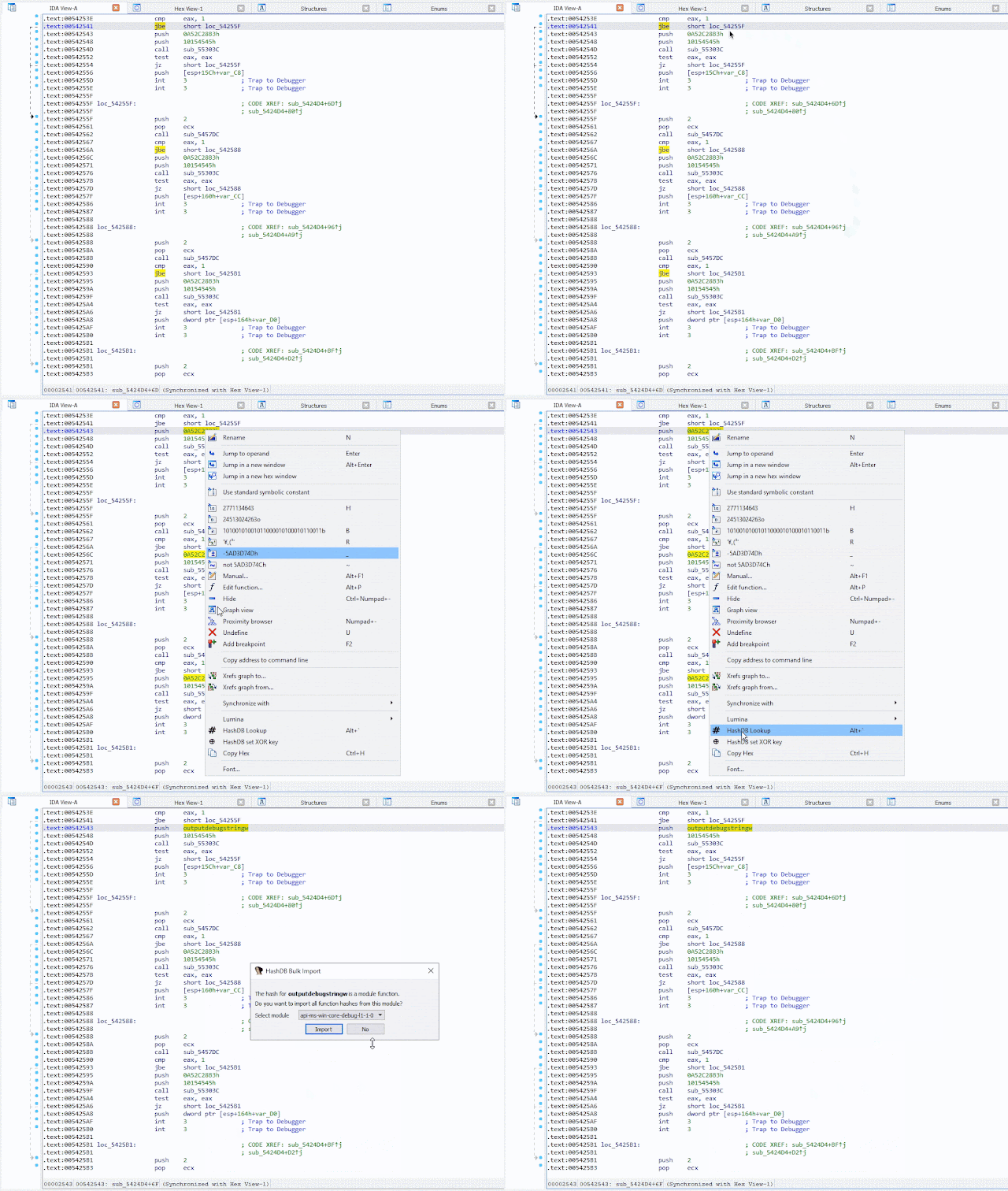
HashDB can be used to look up strings that have been hashed in malware by right-clicking on the hash constant in the IDA disassembly view and launching the HashDB Lookup client.
Settings
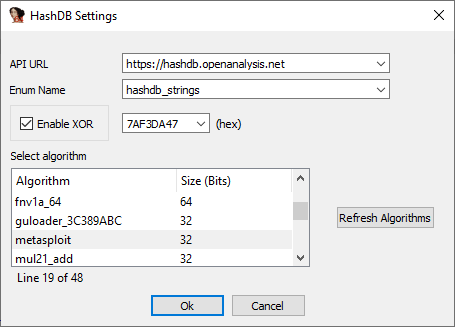
Before the plugin can be used to look up hashes the HashDB settings must be configured. The settings window can be launched from the plugins menu Edit->Plugins->HashDB.
Hash Algorithms
Click Refresh Algorithms to pull a list of supported hash algorithms from the HashDB API, then select the algorithm used in the malware you are analyzing.
Optional XOR
There is also an option to enable XOR with each hash value as this is a common technique used by malware authors to further obfuscate hashes.
API URL
The default API URL for the HashDB Lookup Service is https://hashdb.openanalysis.net/. If you are using your own internal server this URL can be changed to point to your server.
Enum Name
When a new hash is identified by HashDB the hash and its associated string are added to an enum in IDA. This enum can then be used to convert hash constants in IDA to their corresponding enum name. The enum name is configurable from the settings in the event that there is a conflict with an existing enum.
Hash Lookup
Once the plugin settings have been configured you can right-click on any constant in the IDA disassembly window and look up the constant as a hash. The right-click also provides a quick way to set the XOR value if needed.

Bulk Import
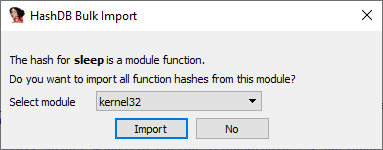
If a hash is part of a module a prompt will ask if you want to import all the hashes from that module. This is a quick way to pull hashes in bulk. For example, if one of the hashes identified is Sleep from the kernel32 module, HashDB can then pull all the hashed exports from kernel32.
Algorithm Search
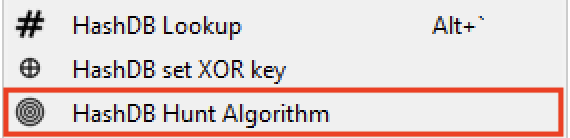
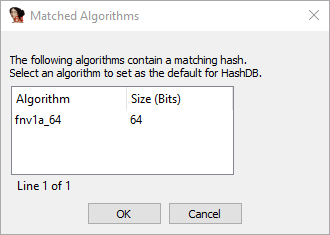
HashDB also includes a basic algorithm search that will attempt to identify the hash algorithm based on a hash value. The search will return all algorithms that contain the hash value, it is up to the analyst to decide which (if any) algorithm is correct. To use this functionality right-click on the hash constant and select HashDB Hunt Algorithm.
All algorithms that contain this hash will be displayed in a chooser box. The chooser box can be used to directly select the algorithm for HashDB to use. If Cancel is selected no algorithm will be selected.
Instead of resolving API hashes individually (inline in code) some malware developers will create a block of import hashes in memory. These hashes are then all resolved within a single function creating a dynamic import address table which is later referenced in the code. In these scenarios the HashDB Scan IAT function can be used.

Simply select the import hash block, right-click and choose HashDB Scan IAT. HashDB will attempt to resolve each individual integer type (DWORD/QWORD) in the selected range.
Installing HashDB
Before using the plugin you must install the python requests module in your IDA environment. The simplest way to do this is to use pip from a shell outside of IDA.
pip install requests
Once you have the requests module installed simply copy the latest release of hashdb.py into your IDA plugins directory and you are ready to start looking up hashes!
The HashDB plugin has been developed for use with the IDA 7+ and Python 3 it is not backwards compatible.
- Hacking Tools For Pc
- Hacking Tools For Mac
- Pentest Tools Find Subdomains
- Hacker
- Hak5 Tools
- Hack Apps
- Hacker Tools Hardware
- Pentest Tools List
- Hacking Tools Windows 10
- Pentest Tools Port Scanner
- Hacking Tools For Games
- Hacker Tools For Pc
- Pentest Tools For Ubuntu
- Hacking Tools 2019
- Pentest Tools Online
- Hacker Tools Linux
- Usb Pentest Tools
- Hack Tool Apk No Root
- Pentest Tools Framework
- Hacker Tools Apk Download
- Hacker Hardware Tools
- Pentest Tools Online
- Hack Tools Mac
- Hacking Tools Pc
- Hacker Tools Mac
- Hak5 Tools
- Hack Tools Mac
- Hacker Tools Github
- Hacks And Tools
- Hacker Hardware Tools
- Hacker Techniques Tools And Incident Handling
- Android Hack Tools Github
- Hacking Tools Kit
- Ethical Hacker Tools
- Bluetooth Hacking Tools Kali
- Hacker Tools 2019
- Tools For Hacker
- Pentest Tools Alternative
- Pentest Tools Url Fuzzer
- Best Hacking Tools 2019
- Hacker Tools Free Download
- Pentest Tools Linux
- Hacking Tools Windows
- Hacker Hardware Tools
- Free Pentest Tools For Windows
- Pentest Tools Online
- Pentest Tools Github
- Github Hacking Tools
- Hacker Tools Apk
- Hacking App
- Hack Website Online Tool
- Hacking App
- Hacker Tools Apk
- Hacking Tools Usb
- Hacker Tools Github
- Hack Tools For Ubuntu
- Pentest Tools Tcp Port Scanner
- Hacking Tools For Windows Free Download
- Github Hacking Tools
- Hacker Tools Free
- Hack Tools Github
- Nsa Hacker Tools
- Termux Hacking Tools 2019
- Github Hacking Tools
- Pentest Tools Online
- Hacker Tools Online
- Hacker Tools 2020
- Beginner Hacker Tools
- Pentest Tools Github
- Hacking Apps
- Pentest Tools Review
- How To Install Pentest Tools In Ubuntu
- Hack Tools For Ubuntu
- Hacking Tools Pc
- Pentest Tools Bluekeep
- Hacking Tools Kit
- Blackhat Hacker Tools
- Pentest Tools Framework
- Nsa Hack Tools
- Hacking Tools Name
- Hacker Tools Github
- Pentest Tools Subdomain
- Pentest Tools Alternative
- Hack Tools For Ubuntu
- Blackhat Hacker Tools
- Hacking Tools Download
- Black Hat Hacker Tools
- Hack Tools For Ubuntu
- Pentest Tools Bluekeep
- Hacker Tools List
- Hacker Tools 2019
- Hacking Tools For Games
- Hacking Tools Usb
- Pentest Tools Subdomain
- Install Pentest Tools Ubuntu
- Best Hacking Tools 2020
- Free Pentest Tools For Windows
- Pentest Box Tools Download
- Easy Hack Tools
- Computer Hacker
- Pentest Recon Tools
- Hak5 Tools
- Hacking App
- World No 1 Hacker Software
- Nsa Hack Tools Download
- Growth Hacker Tools
- Hacking Tools 2020

No comments:
Post a Comment