Tuesday, June 30, 2020

9 Useful Websites for Hackers

  1. Metasploit: Find security issues, verify vulnerability mitigations & manage security assessments with Metasploit. Get the worlds best penetration testing software now.
  2. Hakin9: E-magazine offering in-depth looks at both attack and defense techniques and concentrates on difficult technical issues.
  3. HackRead: HackRead is a News Platform that centers on InfoSec, Cyber Crime, Privacy, Surveillance, and Hacking News with full-scale reviews on Social Media Platforms.
  4. Exploit DB: An archive of exploits and vulnerable software by Offensive Security. The site collects exploits from submissions and mailing lists and concentrates them in a single database.
  5. Phrack Magazine: Digital hacking magazine.
  6. Packet Storm: Information Security Services, News, Files, Tools, Exploits, Advisories and Whitepapers.
  7. Hacked Gadgets: A resource for DIY project documentation as well as general gadget and technology news.
  8. KitPloit: Leading source of Security Tools, Hacking Tools, CyberSecurity and Network Security.
  9. The Hacker News: The Hacker News — most trusted and widely-acknowledged online cyber security news magazine with in-depth technical coverage for cybersecurity.

Wednesday, June 10, 2020

Nmap: Getting Started Guide


Nmap is a free utility tool for network discovery, port scanning and security auditing, even though we can use it for more than that but in this article we will learn how to do these three things with nmap.

The original author of nmap is Gordon Lyon (Fyodor). Nmap is licensed under GPL v2 and has available ports in many different languages. Nmap is available for Linux, Windows, and Mac OS X. You can download your copy of nmap from their website.

Lets get started with nmap.

When performing pentests we always look for networks we are going to attack. We need to identify live hosts on the network so that we can attack them. There are plenty of tools available for finding live hosts on a network but nmap is one of the best tools for doing this job.

Lets start with simple host (target) discovery scans i,e scans that will tell us which ip address is up on our target network. Those ip addresses which are up on our target network are the ones that are assigned to a device connected on our target network. Every device on the network is going to have a unique ip address.
To perform a simple host discovery scan we use the following command

nmap -v -sn 10.10.10.0/24


flags we used in the above command are
-v for verbose output
-sn to disable port scan (we don't want to scan for ports right now)

Following the flags is the ip address of the target network on which we want to look for live hosts. The /24 at the end of the ip address is the CIDR that specifies the subnet of the network on which we are looking for live hosts.

After running the above command you should get a list of live hosts on your target network.
If you just want to know the list of ip addresses your command is going to scan, you can use the -sL flag of the nmap like this.

nmap -sL 10.10.10.0/24

this command will simply output the list of ip addresses to scan.

We sometimes want to do dns resolution (resolving ip addresses to domain names) when performing our network scans and sometimes we don't want dns resolution. While performing a host discovery scan with nmap if we want to perform dns resolution we use -R flag in our command like this:

nmap -v -sn -R 10.10.10.0/24

And if we don't want to perform dns resolution of hosts during our scan we add the -n flag to our command like this:

nmap -v -sn -n 10.10.10.0/24

After we have discovered the hosts that are up on our target network, we usually put the ip addresses of these hosts into a file for further enumeration.

Next step in our enumeration would be to detect which operating system and which ports are running on these live hosts, for that we run this command:

nmap -O -v 10.10.10.119


here we use -O (capital o not zero) for operating system detection and by default nmap performs SYN Scan for port discovery. However nmap scans for 1000 ports only by default of a particular host.

To make nmap go over a list of ip addresses in a file we use -iL flag like this:

nmap -O -v -iL targetlist

where targetlist is the name of the file which contains ip addresses that we want to perform port scan on.

To make nmap scan all the ports of a target we use the -p flag like this:

nmap -p- -v 10.10.10.121

We can also specify a range of ports using the -p flag like this:

nmap -p1-500 -v 10.10.10.121

here 1-500 means scan all the ports from 1 to 500.

We can use a number of scan techniques to discover open ports on our network but I will only discuss some of them for brevity.

We can perform a TCP SYN scan using nmap with -sS flag like this:

nmap -sS -v 10.10.10.150

We have also flags for TCP connect and ACK scans which are -sT -sA

nmap -sT -v 10.10.10.150

nmap -sA -v 10.10.10.150

We can also perform UDP scan as well instead of TCP scan using -sU flag

nmap -sU -v 10.10.10.150

We can perform TCP Null, FIN, and Xmas scans using the flags -sN, -sF, -sX

nmap -sN -v 10.10.10.150

nmap -sF -v 10.10.10.150

nmap -sX -v 10.10.10.150

If you don't know what these scans are then please visit Port Scanning Techniques and Algorithms for explanation.

After discovering the open ports on our target host, we want to enumerate what services are running on those open ports. To enumerate services and versions information on open ports we use the -sV flag like this:

nmap -sV -v 10.10.10.118

This should give us information about what services are running on what ports and what versions of those services are running on the target host.

nmap has an interesting feature called NSE nmap scripting engine. It allows users to write their own scripts, using the Lua programming language, to automate a wide variety of networking tasks. nmap ships with a diverse set of scripts which are very helpful to enumerate a target. To use the nmap default set of scripts while enumerating the target, we use the -sC flag like this:

nmap -sC -sV -v 10.10.10.118

We can also save the results of our nmap scans to a file using the -o flag like this

nmap -sC -sV -v -oA defaultscan 10.10.10.119

here -oA tells the nmap to output results in the three major formats at once and defaultscan is the name of the file that will be prepended to all the three output files.

This is the end of this short tutorial see you next time.

References:
https://nmap.org/book/scan-methods-null-fin-xmas-scan.html

Read more


  1. Hacker Ethic
  2. Pentest+ Vs Oscp
  3. Hacking Vpn
  4. Pentest Wiki
  5. Pentest Services
  6. Hacker On Computer
  7. Pentest Report
  8. Hacking Health
  9. Pentest Owasp Top 10
  10. Pentest Basics
  11. Hackerrank
  12. Pentestmonkey Cheat Sheet
  13. Pentest Nmap
  14. Hacking Jacket
  15. Pentest Wordpress
  16. Pentest Plus
  17. Pentest News
  18. Hacker News

The Pillager 0.7 Release

I spent the last couple days recoding the Pillager, getting rid of bugs, optimizing code, making it more extendable and more solid overall. So this post is to release the new code.  However, with that being said, the Pillager is in mass revision right now and I added some more developers to the team to add a whole host of new database attacking features as well as moving past databases and into other areas of post exploitation pillaging. Soon to be released..  As usual this tool and any tool i create is based on my issues when performing penetration tests and solves those problems.. If you have any insight or comments i will certainly take them into consideration for future releases.

For now check out Version 0.7.. Named searches and Data searches via external config files are now functioning properly as well as other bugs fixed along the way... Drop this in a BT5 VM and make sure you have your DB python stuff installed per the help docs and you should be good to go.  If you are looking to use oracle you are going to have to install all the oracle nonsense from oracle or use a BT4r2 vm which has most of the needed drivers minus cxoracle which will need to be installed.

http://consolecowboys.org/pillager/pillage_0.7.zip


Ficti0n$ python pillager.py
 
[---] The Database Pillager (DBPillage) [---]
[---] CcLabs Release [---]
[---] Authors: Ficti0n, [---]
[---] Contributors: Steponequit [---]
[---] Version: 0.7 [---]
[---] Find Me On Twitter: ficti0n [---]
[---] Homepage: http://console-cowboys.blogspot.com [---]

Release Notes:
 --Fixed bugs and optimized code
 --Added Docstrings
 --Fixed Named and Data searches from config files                 

About:
The Database Pillager is a multiplatform database tool for searching and browsing common
database platforms encountered while penetration testing. DBPillage can be used to search
for PCI/HIPAA data automatically or use DBPillage to browse databases,display data.
and search for specified tables/data instances.
DBpillage was designed as a post exploitation pillaging tool with a goal of targeted
extraction of data without the use of database platform specific GUI based tools that
are difficult to use and make my job harder.

Supported Platforms:
        --------------------
-Oracle
-MSSQL
-MYSQL
        -PostGreSQL
     

        Usage Examples:
        ************************************************************************
        
        For Mysql Postgres and MsSQL pillaging:
        ---------------------------------------
        python dbPillage -a [address] -d [dbType] -u [username] -p [password]
        
        
        For Oracle pillaging you need a SID connection string:
        ------------------------------------------------------
        python dbPillage-a [address]/[sid] -d [dbType] -u [username] -p [password]
        

        Grab some hashes and Hipaa specific:(Default is PCI)
        ------------------------------------
        python dbPillage -a [address] -d [dbType] -u [username] -p [password] --hashes -s hipaa


Drop into a SQL CMDShell:
-------------------------
        python dbpillage.py -a [address] -d [dbType] -u [username] -p [password] -q

Config file specified searches:
-------------------------------
Search for data Items from inputFiles/data.txt:
        python dbpillage.py -a [address] -d [dbType] -u [username] -p [password] -D

Search for specific table names from inputFiles/tables.txt:
python dbpillage.py -a [address] -d [dbType] -u [username] -p [password] -N


        Switch Options:
        ---------------------
        -# --hashes = grab database password hashes
        -l --limit  = limit the amount of rows that are searched or when displaying data (options = any number)
        -s --searchType = Type of data search you want to perform (options:pci, hipaa, all)(PCI default)
        -u --user = Database servers username
        -p --pass = Password for the database server
        -a --address = Ipaddress of the database server
        -d --database = The database type you are pillageing (options: mssql,mysql,oracle,postgres)
        -r --report = report format (HTML, XML, screen(default))
        -N --nameSearch = Search via inputFiles/tables.txt
        -D --dataSearch = Targeted data searches per inputFiles/data.txt
-q --queryShell = Drop into a SQL CMDshell in mysql or mssql
     
     
        Prerequisites:
        -------------
        python v2  (Tested on Python 2.5.2 BT4 R2 and BT5 R3 - Oracle stuff on BT4r2 only unless you install the drivers from oracle)
        cx_oracle (cx-oracle.sourceforge.net)
        psycopg2  (initd.org/psycopg/download/)
        MySQLdb   (should be on BT by default)
        pymssql   (should be on BT by default)
     

Related posts

Spaghetti: A Website Applications Security Scanner


About Spaghetti
   Author: m4ll0k   Spaghetti is an Open Source web application scanner, it is designed to find various default and insecure files, configurations, and misconfigurations. Spaghetti is built on Python 2.7 and can run on any platform which has a Python environment.

Spaghetti Installation:

Spaghetti's Features:
   Fingerprints:
  • Server:
  • Web Frameworks (CakePHP,CherryPy,...)
  • Web Application Firewall (Waf)
  • Content Management System (CMS)
  • Operating System (Linux,Unix,..)
  • Language (PHP,Ruby,...)
  • Cookie Security
   Discovery:
  • Bruteforce:Admin Interface
    Common Backdoors
    Common Backup Directory
    Common Backup File
    Common Directory
    Common FileLog File
  • Disclosure: Emails, Private IP, Credit Cards
   Attacks:
  • HTML Injection
  • SQL Injection
  • LDAP Injection
  • XPath Injection
  • Cross Site Scripting (XSS)
  • Remote File Inclusion (RFI)
  • PHP Code Injection
   Other:
  • HTTP Allow Methods
  • HTML Object
  • Multiple Index
  • Robots Paths
  • Web Dav
  • Cross Site Tracing (XST)
  • PHPINFO
  • .Listing
   Vulns:
  • ShellShock
  • Anonymous Cipher (CVE-2007-1858)
  • Crime (SPDY) (CVE-2012-4929)
  • Struts-Shock
Spaghetti Example:
python spaghetti --url example.com --scan 0 --random-agent --verbose


Related links


Tuesday, June 9, 2020

The Pillager 0.7 Release

I spent the last couple days recoding the Pillager, getting rid of bugs, optimizing code, making it more extendable and more solid overall. So this post is to release the new code.  However, with that being said, the Pillager is in mass revision right now and I added some more developers to the team to add a whole host of new database attacking features as well as moving past databases and into other areas of post exploitation pillaging. Soon to be released..  As usual this tool and any tool i create is based on my issues when performing penetration tests and solves those problems.. If you have any insight or comments i will certainly take them into consideration for future releases.

For now check out Version 0.7.. Named searches and Data searches via external config files are now functioning properly as well as other bugs fixed along the way... Drop this in a BT5 VM and make sure you have your DB python stuff installed per the help docs and you should be good to go.  If you are looking to use oracle you are going to have to install all the oracle nonsense from oracle or use a BT4r2 vm which has most of the needed drivers minus cxoracle which will need to be installed.

http://consolecowboys.org/pillager/pillage_0.7.zip


Ficti0n$ python pillager.py
 
[---] The Database Pillager (DBPillage) [---]
[---] CcLabs Release [---]
[---] Authors: Ficti0n, [---]
[---] Contributors: Steponequit [---]
[---] Version: 0.7 [---]
[---] Find Me On Twitter: ficti0n [---]
[---] Homepage: http://console-cowboys.blogspot.com [---]

Release Notes:
 --Fixed bugs and optimized code
 --Added Docstrings
 --Fixed Named and Data searches from config files                 

About:
The Database Pillager is a multiplatform database tool for searching and browsing common
database platforms encountered while penetration testing. DBPillage can be used to search
for PCI/HIPAA data automatically or use DBPillage to browse databases,display data.
and search for specified tables/data instances.
DBpillage was designed as a post exploitation pillaging tool with a goal of targeted
extraction of data without the use of database platform specific GUI based tools that
are difficult to use and make my job harder.

Supported Platforms:
        --------------------
-Oracle
-MSSQL
-MYSQL
        -PostGreSQL
     

        Usage Examples:
        ************************************************************************
        
        For Mysql Postgres and MsSQL pillaging:
        ---------------------------------------
        python dbPillage -a [address] -d [dbType] -u [username] -p [password]
        
        
        For Oracle pillaging you need a SID connection string:
        ------------------------------------------------------
        python dbPillage-a [address]/[sid] -d [dbType] -u [username] -p [password]
        

        Grab some hashes and Hipaa specific:(Default is PCI)
        ------------------------------------
        python dbPillage -a [address] -d [dbType] -u [username] -p [password] --hashes -s hipaa


Drop into a SQL CMDShell:
-------------------------
        python dbpillage.py -a [address] -d [dbType] -u [username] -p [password] -q

Config file specified searches:
-------------------------------
Search for data Items from inputFiles/data.txt:
        python dbpillage.py -a [address] -d [dbType] -u [username] -p [password] -D

Search for specific table names from inputFiles/tables.txt:
python dbpillage.py -a [address] -d [dbType] -u [username] -p [password] -N


        Switch Options:
        ---------------------
        -# --hashes = grab database password hashes
        -l --limit  = limit the amount of rows that are searched or when displaying data (options = any number)
        -s --searchType = Type of data search you want to perform (options:pci, hipaa, all)(PCI default)
        -u --user = Database servers username
        -p --pass = Password for the database server
        -a --address = Ipaddress of the database server
        -d --database = The database type you are pillageing (options: mssql,mysql,oracle,postgres)
        -r --report = report format (HTML, XML, screen(default))
        -N --nameSearch = Search via inputFiles/tables.txt
        -D --dataSearch = Targeted data searches per inputFiles/data.txt
-q --queryShell = Drop into a SQL CMDshell in mysql or mssql
     
     
        Prerequisites:
        -------------
        python v2  (Tested on Python 2.5.2 BT4 R2 and BT5 R3 - Oracle stuff on BT4r2 only unless you install the drivers from oracle)
        cx_oracle (cx-oracle.sourceforge.net)
        psycopg2  (initd.org/psycopg/download/)
        MySQLdb   (should be on BT by default)
        pymssql   (should be on BT by default)
     

Related news


ShellShock Payload Sample Linux.Bashlet


Someone kindly shared their sample of the shellshock malware described by the Malware Must die group - you can read their analysis here:

File: fu4k_2485040231A35B7A465361FAF92A512D
Size: 152
MD5: 2485040231A35B7A465361FAF92A512


VIrustotal

SHA256: e74b2ed6b8b005d6c2eea4c761a2565cde9aab81d5005ed86f45ebf5089add81
File name: trzA114.tmp
Detection ratio: 22 / 55
Analysis date: 2014-10-02 05:12:29 UTC ( 6 hours, 50 minutes ago )
Antivirus Result Update
Ad-Aware Linux.Backdoor.H 20141002
Avast ELF:Shellshock-A [Expl] 20141002
Avira Linux/Small.152.A 20141002
BitDefender Linux.Backdoor.H 20141002
DrWeb Linux.BackDoor.Shellshock.2 20141002
ESET-NOD32 Linux/Agent.AB 20141002
Emsisoft Linux.Backdoor.H (B) 20141002
F-Secure Linux.Backdoor.H 20141001
Fortinet Linux/Small.CU!tr 20141002
GData Linux.Backdoor.H 20141002
Ikarus Backdoor.Linux.Small 20141002
K7AntiVirus Trojan ( 0001140e1 ) 20141001
K7GW Trojan ( 0001140e1 ) 20141001
Kaspersky Backdoor.Linux.Small.cu 20141001
MicroWorld-eScan Linux.Backdoor.H 20141002
Qihoo-360 Trojan.Generic 20141002
Sophos Linux/Bdoor-BGG 20141002
Symantec Linux.Bashlet 20141002
Tencent Win32.Trojan.Gen.Vdat 20141002
TrendMicro ELF_BASHLET.A 20141002
TrendMicro-HouseCall ELF_BASHLET.A 20141002
nProtect Linux.Backdoor.H 20141001
More articles

How To Repair A Crashed SD Card And Protect Your Data

One of the many reasons users prefer Android devices is the ability to expand the amount of available storage space using the MicroSD Card. Since we have the ability add up to 256GB of external storage to Android devices today, you're bound to choke up when the SD card crashes without any tell-tale signs.
If you're experiencing issues on how to repair a crashed SD card on your Android device, there are certain fixes you can try out. Since there's not a singular solution to SD Card issues, we've created a guide to help you detect the issue with your external storage and mentioned multiple solutions to get your SD card working and even retrieve your stored data along with it.


Before you start

Don't format the card if you want to retain any of the photos on it. You can follow the tips in our separate article on how to format a write-protected SD card after you've tried to recover any files that are on your card.

Now, try and find a different card reader. If you've inserted an SD card into your laptop or PC's built-in slot and nothing happens, try using a different computer or a USB card reader.
Sometimes it's the reader at fault – not the card. You can buy a USB SD card reader online for just a couple of pounds which will accept both microSD and standard SD cards.

Steps to Repair a Crashed SD Card and Protect your Data:

Step 1 – Physically clean the SD Card

Despite being durable and built to last, SD cards are prone to crashing sometimes due to physical damage. Since you carry your phone around everywhere, some dirt and dust are bound to fill up in the cracks, that can make SD card stop working from time to time.
The first thing you can try to do on how to repair a crashed SD card is physically scrub and clean it.
  • Remove the MicroSD card from your Android device and place it on a clean surface. Make sure that you turn off your phone before pulling out the SD card for safety.
  • Flip the MicroSD card and using a white eraser, gently scrub the gold contact pins of the SD card to get rid of any residual dirt or grime.
  • If you have an alcohol-based cleaning solution or even nail polish remover around, dab it on to the connector pins using a Q-tip and gently rub it.
Once the SD card has dried out, you can plug it back into your Android device and turn it on to see if the solution has worked.


Step 2 – Format the SD Card

If your SD card is being detected by the Android device but you're having trouble accessing the saved files, there's a good chance that the files are corrupt. This could either be due to a particular broken file in the saved storage, or a virus that is causing the issue.
Either way, the only option there is left for you to try out is make the SD card reusable for formatting it.
  • From the home screen of your Android device, head over to the Settings app and then scroll down to find the Storage
  • In the Storage tab, you'll be able to find the Erase SD Card option, so go ahead and select it.
  • Confirm your action to delete all of the files and folders stored on your SD card and this should effectively solve the issue.

Step 3 – Check the SD card compatibility

If you are trying to figure out how to repair a crashed SD card on an older Android device, you might just need to look at the details more carefully. If your SD card fails to be recognized on the mobile device but works with your computer, the problem could be related to compatibility.
  • If the MicroSD card that you are trying to use with your older phone is SDXC version (built for higher transfer speeds), it will not be recognized.
  • Look up the maximum capacity of expandable storage that is supported by your device, since they can vary from starting at 64GB to all the way up to 256GB.

Step 4 – Diagnose the SD card using a PC

If a simple format did not help you solve the SD card problem, you might need a more technical analysis of the issue. To do so, you can plug in your SD card into a computer and use the diagnostic tools to find out the pertaining errors and effectively fix them.
  • Connect your Android mobile device to a computer using a USB cable.
  • Make sure that you connect Android as MSC (Mass storage mode) and not MTP (Media transfer mode). You can do this using the notification menu once you connect the phone to your computer.
  • Launch the Windows Explorer and right click on the SD card driver you see on the screen. In the options menu, choose Properties – Tools – Error Checking and wait for the entire process to complete.
  • The computer will try to update the software for your SD card and fix any errors that are causing it to crash.

Step 5 – Use chkdsk to fix/repair a corrupted SD card without data loss

The "chkdsk" command is your first choice for damaged SD card repair. Requiring no format, it allows you to fix or repair a corrupted SD card and regain access to all your important files on the device. Let's see how it works. (I'm using Windows 7 for this demonstration)
1. Plug in your SD card to your computer with a card reader.
2. Go to the start menu, type in "cmd" in a search bar, hit enter and then you can see something named "cmd. exe" in a list of programs.
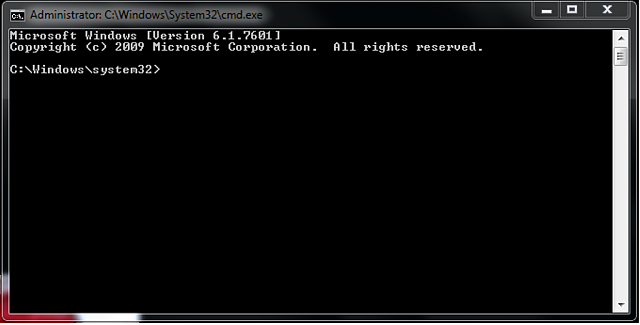
3. Right-click "cmd. exe" and then you will get the following command windows that allow you to fix your corrupted SD card without formatting.
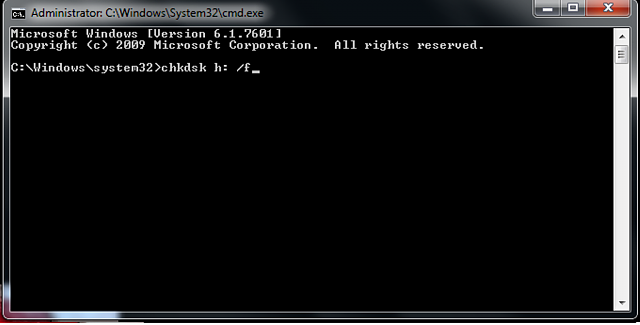
4. Type in "chkdsk /X /f sd card letter:" or "chkdsk sd card letter: /f ", for example,"chkdsk /X /f G:" or "chkdsk h: /f".
After finishing all the steps, Windows will have checked and fixed the file system of the SD card. It usually takes several minutes. After that, if you see "Windows has made corrections to the file system" in the command window, then congratulations! The damaged SD card is successfully fixed and you can see your data again. If not, you should try a third-party data recovery software to retrieve your files from the damaged SD card and repair it by formatting.
Once the process has been completed, you can go ahead and pop the SD card back into your Android device and see if the issue has been resolved.

Step 6 : Use EaseUS Data Recovery Wizard to recover data from damaged SD card

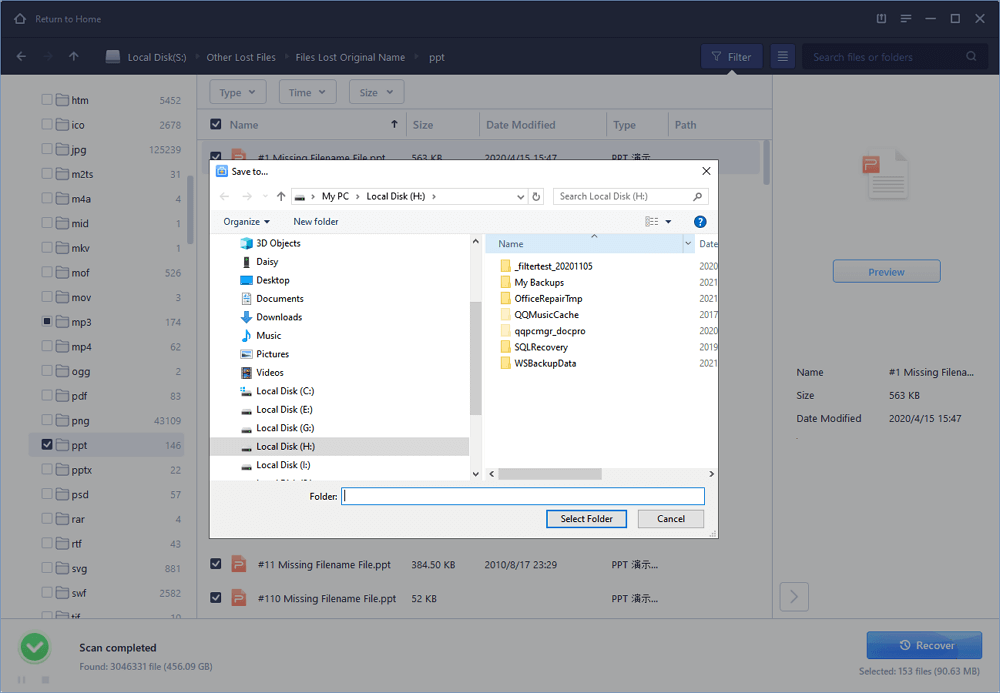
1. Connect the corrupted SD card to your PC, launch EaseUS's data recovery software, select the card and click "Scan".
2. A quick scan will first start to search all the lost and existing data on the SD card. And after that, a deep scan will automatically launch in order to find more files.
3. After the scan, choose those files you want to recover and click the "Recover" button to retrieve them back.

Final Words :

So finally through this article, you have got to know about the method by which the SD card could be repaired and hence the data in it could be saved for the further access. We have tried to present the method in easy to grab manner and we believe that you could possibly get to know about it easily. Hope that you would have liked the information in this post, if it is so then please share it with others. Also, do not forget to share the post with others, let most of the people know about the method. Share your comments about the post through using the comment box below. At last never the fewer thanks for reading this post!

Related posts


  1. Pentest Jobs
  2. Pentest Tools Github
  3. Hacker Types
  4. Hacking Wifi
  5. Pentest Practice
  6. Hacker Keyboard
  7. Hackerrank Sql
  8. Hacking Simulator
  9. Pentest Vpn
  10. Hacking Games

TLS-Attacker V2.2 And The ROBOT Attack

We found out that many TLS implementations are still vulnerable to different variations of a 19-year old Bleichenbacher's attack. Since Hanno argued to have an attack name, we called it ROBOT: https://robotattack.org

Given the new attack variants, we released a new version of TLS-Attacker 2.2, which covers our vulnerabilities.

Bleichenbacher's attack from 1998

In 1998, Daniel Bleichenbacher discovered that the error messages given by SSL servers for errors in the PKCS #1 1.5 padding allow an adversary to execute an adaptive-chosen ciphertext attack. This attack also belongs to the category of padding oracle attacks. By performing the attack, the adversary exploits different responses returned by the server that decrypts the requests and validates the PKCS#1 1.5 padding. Given such a server, the attacker can use it as an oracle and decrypt ciphertexts.
We refer to one of our previous blog posts for more details.

OK, so what is new in our research?

In our research we performed scans of several well-known hosts and found out many of them are vulnerable to different forms of the attack. In the original paper, an oracle was constructed from a server that responded with different TLS alert messages. In 2014, further side-channels like timings were exploited. However, all the previous studies have considered mostly open source implementations. Only a few vulnerabilities have been found.

In our scans we could identify more than seven vulnerable products and open source software implementations, including F5, Radware, Cisco, Erlang, Bouncy Castle, or WolfSSL. We identified new side-channels triggered by incomplete protocol flows or TCP socket states.

For example, some F5 products would respond to a malformed ciphertext located in the ClientKeyExchange message with a TLS alert 40 (handshake failure) but allow connections to timeout if the decryption was successful. We could observe this behaviour only when sending incomplete TLS handshakes missing ChangeCipherSpec and Finished messages.
See our paper for more interesting results.

Release of TLS-Attacker 2.2

These new findings motivated us to implement the complete detection of Bleichenbacher attacks in our TLS-Attacker. Before our research, TLS-Attacker had implemented a basic Bleichenbacher attack evaluation with full TLS protocol flows. We extended this evaluation with shortened protocol flows with missing ChangeCipherSpec and Finished messages, and implemented an oracle detection based on TCP timeouts and duplicated TLS alerts. In addition, Robert (@ic0ns) added many fixes and merged features like replay attacks on 0-RTT in TLS 1.3.
You can find the newest version release here: https://github.com/RUB-NDS/TLS-Attacker/releases/tag/v2.2

TLS-Attacker allows you to automatically send differently formatted PKCS#1 encrypted messages and observe the server behavior:
$ java -jar Attacks.jar bleichenbacher -connect [host]:[port]
In case the server responds with different error messages, it is most likely vulnerable. The following example provides an example of a vulnerable server detection output:
14:12:42 [main] CONSOLE attacks.impl.Attacker - A server is considered vulnerable to this attack if it responds differently to the test vectors.
14:12:42 [main] CONSOLE attacks.impl.Attacker - A server is considered secure if it always responds the same way.
14:12:49 [main] CONSOLE attacks.impl.Attacker - Found a difference in responses in the Complete TLS protocol flow with CCS and Finished messages.
14:12:49 [main] CONSOLE attacks.impl.Attacker - The server seems to respond with different record contents.
14:12:49 [main] INFO attacks.Main - Vulnerable:true
In this case TLS-Attacker identified that sending different PKCS#1 messages results in different server responses (the record contents are different).
Related word
  1. Pentest Stages
  2. Pentest With Kali
  3. Hacker Computer
  4. Is Hacking Illegal
  5. Pentestbox
  6. Hacking For Dummies
  7. Is Hacking Illegal